Why specs are the missing layer for AI-accelerated teams — and how to put it into practice.
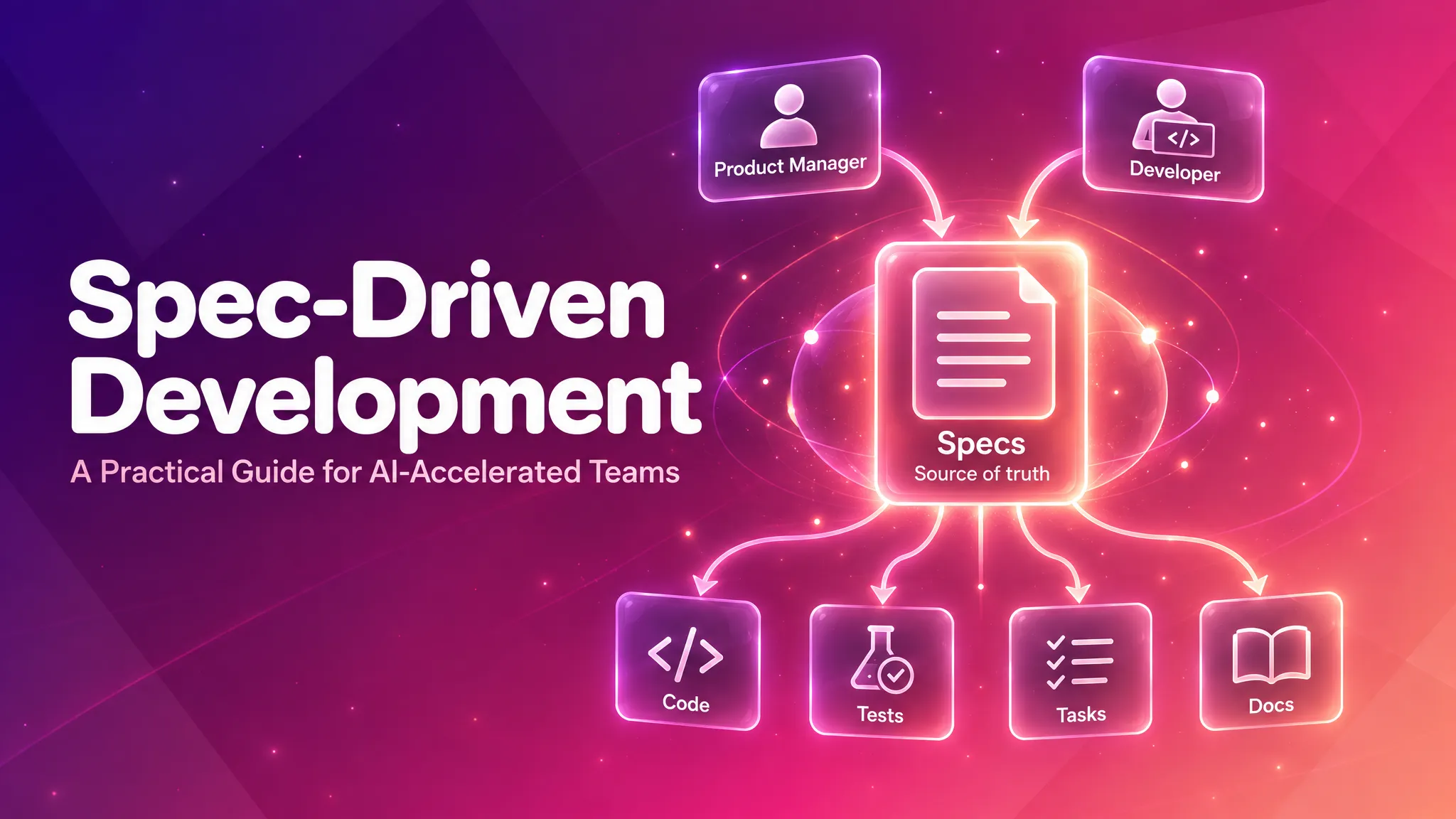
After running Spec-Driven Development across 8 production projects at Tecknoworks, this is the guide — what works, what doesn’t, and the patterns we landed on.
Table of contents
Open Table of contents
Why Spec-Driven Development
What changed, where the cost moved, and why specs are the lightest fix that compounds.
Coding isn’t the bottleneck anymore
Software development used to have a clear bottleneck: writing the code. Since generative AI landed in mainstream coding workflows, that has flipped completely. With modern AI coding assistants, almost every new feature or story can be implemented in a single, well-defined prompt — provided you have the right requirements and context at hand.
The bottleneck is no longer coding. It’s understanding what to build — and giving the LLM the right context to build it.
That bottleneck doesn’t matter for prototypes — vibe-code freely, throw the prompts away, ship. But for production software that evolves — real users, features accumulating over months or years, multiple authors, new requirements every week — vibe-coding stops compounding. That’s what eats the coding gains AI gave you. And that’s what Spec-Driven Development is built for.
The new bottleneck: requirements + context
Three things have to happen before AI can implement a feature:
- The requirements have to be defined and understood.
- The relevant context — existing patterns, related modules, prior decisions, constraints — has to be gathered.
- All of that has to be packaged into something the LLM can actually ingest.
Today, all three are scattered. Requirements live across PMs’ minds, Jira, Confluence, Notion, meeting recordings, and Teams. Context lives in senior engineers’ heads, old PRs, and tribal knowledge. The result: engineers who can theoretically ship several times faster spend most of their time on requirements archaeology and context assembly.
Onboarding suffers the same way — every new joiner re-derives what the product is meant to do from scattered Jira threads and senior-engineer pings.
This is where Spec-Driven Development compounds. A spec captures the requirements, the constraints, and the relevant context in plain Markdown — already in a format the LLM consumes natively. Find it, structure it, package it for the LLM collapses into open the file.
Specs solve the alignment problems code can’t
One of the biggest costs in evolving software isn’t writing code — it’s PM-developer alignment. Without a shared, current record of what the system is supposed to do, every conversation re-derives the same context, losing detail each time. The structural reason: code is a lossy projection of intent. Why a feature exists, what was deliberately excluded, what constraints shaped the design — none of that lives in the code. When AI generates the code and the prompt gets thrown away, you’re version-controlling the output and shredding the source.
The spec collapses this into a single artifact: the diff is the conversation, and disagreements surface when reviewing the spec, not two weeks later in a PR.
Two more failure modes specs eliminate by construction:
- Stale Jira tickets. Tickets conflict, go stale, contradict each other; a developer on a new story can unknowingly violate decisions in an older ticket nobody remembers. The current spec can’t go stale this way.
- The bug-vs-feature debate. If the system doesn’t match the spec, it’s a bug. If the behavior isn’t in the spec, it’s a feature request. No more “should have been obvious.”
AI works from the spec, not from assumptions
AI coding assistants are only as good as the context you hand them. With requirements scattered across Jira, Confluence, Slack threads, and senior engineers’ heads, an assistant pointed at a feature has to fill in the gaps with guesses. That’s where most “the AI rebuilt the wrong thing” stories come from — not bad models, missing context.
With a spec as the input, the AI sees the full picture in one place:
- Goals — what success looks like
- Non-goals — what’s deliberately out of scope
- Constraints — what cannot change
- Acceptance criteria — exactly what to verify against
The model isn’t guessing where the boundaries are; it’s reading them. The failure mode collapses from “AI rewrote half the module chasing a misinterpretation” down to “AI implemented the spec — verify against the acceptance criteria.” Bugs that originate in requirements ambiguity largely disappear, leaving the technical bugs that review and tests were built to catch.
Picking up new tasks
Picking up someone else’s task is a context-loss event: re-explaining requirements, pinging the original author, digging through Jira to reconstruct what was actually agreed. The cost is the same whether the new owner is a junior developer, a different squad, or an AI assistant — someone has to rebuild what was already in the original author’s head.
Specs collapse that to a file path — “it’s in /specs/reporting.md, pick it up.” The new owner starts from the same grounded artifact the original author worked from. No re-derivation, no missing context.
The error space also narrows. Mistakes on a task fall into two buckets: product mistakes (built the wrong thing) and technical mistakes (bugs, regressions). Specs eliminate the first — the spec is the contract. What’s left is the second, which is what code review and tests were built for anyway.
And it compounds — bigger than the per-task coding speedup, because it pays off on every handoff, every onboarding, every AI-assisted task.
What a Spec Actually Is
A spec is a Markdown file that describes — in plain language — what your system is supposed to do for users. The full /specs folder, taken together, is a single, version-controlled, exhaustive record of product behavior. And it’s always current — the spec describes what the system is meant to do right now, not what it was meant to do six months ago when some original ticket was written. That distinction matters more than it sounds, and we’ll come back to it in a moment. Spec-Driven Development is the practice of treating that folder as the source of truth: code is generated from it, tests trace back to it, documentation is regenerated from it. The code becomes downstream of the spec. The spec becomes the contract.
That’s a small but important inversion. Most teams treat code as the source of truth and docs as commentary that goes stale a week later. Spec-Driven Development flips the polarity.
What derives from the spec
Once the spec is the source of truth, everything downstream regenerates from it: source code, tests, tasks, documentation. When the spec changes, the implementation changes — and so do the tests, the docs, and the work plan.
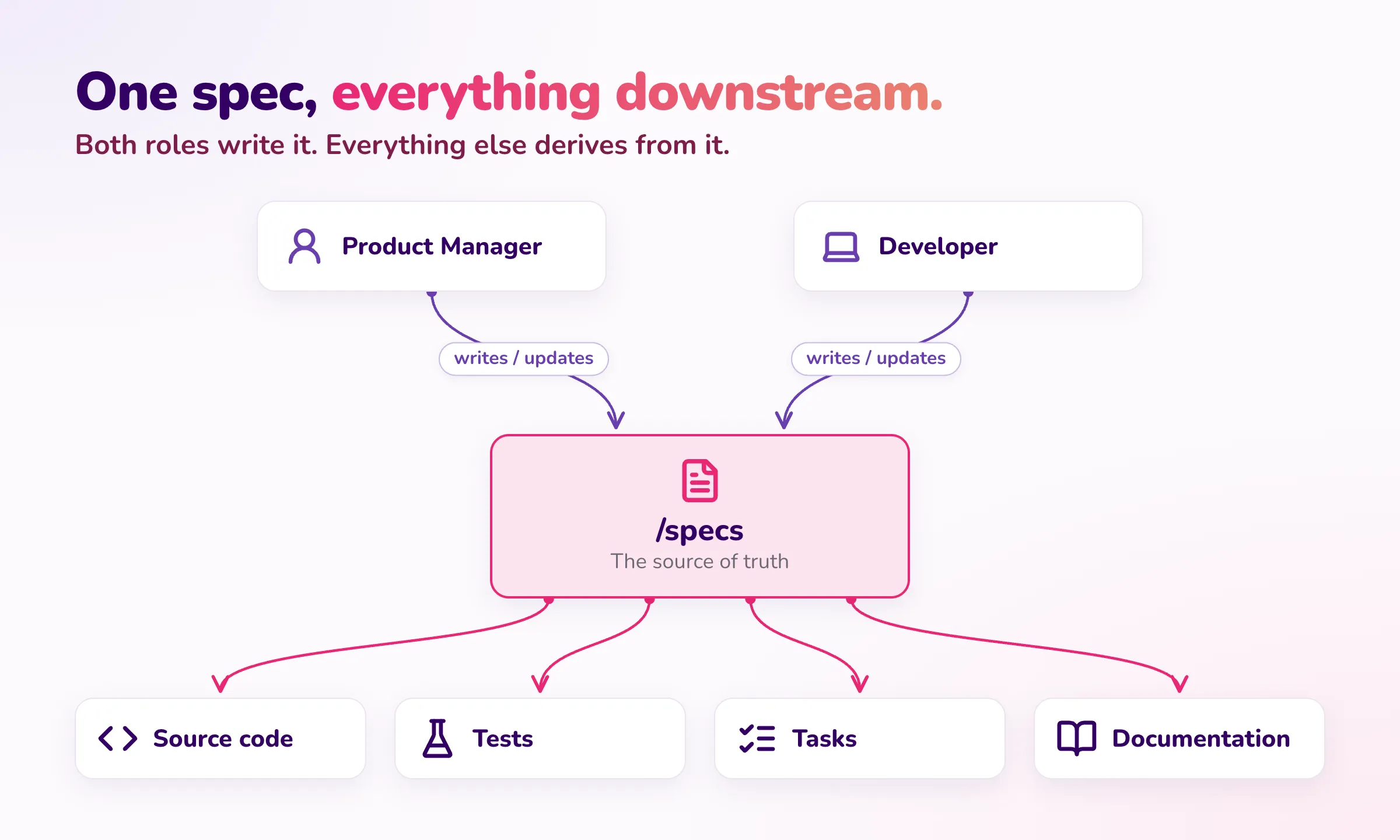
The same gains AI brought to coding now apply anywhere downstream of the spec — for tests, for tasks, for documentation. We’ll come back to specific applications in Specs Beyond Coding.
Spec vs Jira ticket vs PRD
Someone might reasonably ask: “don’t user stories already do this?” Not really. These three artifacts capture different shapes of requirement, and conflating them is one of the reasons teams hesitate to adopt Spec-Driven Development (“we already have Jira”).
| Artifact | Shape | Time horizon |
|---|---|---|
| PRD | Formal deliverable defining what the product will be. | Snapshot — written once at project or initiative kickoff. |
| Jira ticket | A scoped unit of work the team is doing this sprint. | Snapshot — frozen the moment QA approves it. |
| Spec | A living description of what the product currently does and should do. | Continuous — updated every time the requirement changes. |
A Jira ticket is a snapshot. Once QA-approved, it freezes there — three months later, when a new requirement contradicts it, the ticket is part of the past, not the present. The spec is the present. It’s continuously updated, so the diff between yesterday’s spec and today’s spec is the work being done now. That’s exactly what makes specs useful for AI coding assistants: they always reflect current intent.
Specs don’t automatically replace Jira. By default, they sit alongside it: Jira keeps doing what it’s good at — sprint planning, task tracking, time logging, stakeholder reporting. Specs become the exhaustive, current record of what the product does. One is the changelog of work; the other is the contract for behavior.
That said, several teams we’ve worked with have dropped Jira entirely once specs became the primary alignment surface — including the PMs themselves. On one client engagement, the PM took over spec authorship directly: after every meeting, he updated the specs from the transcript, and we never created a Jira ticket again. Whether to keep Jira or move to a Markdown-only model comes down to organizational requirements (reporting, time tracking, audit). The trade-off is covered in Specs and Project Management below, and the specific story is in What we’ve seen in practice.
Specs vs technical documentation
Specs describe what and why — acceptance criteria, user workflows, business constraints, non-goals. They should be readable by a non-technical stakeholder.
Technical documentation describes how — architecture, API contracts, data models, deployment topology. That lives separately (in docs/, ADRs, or a wiki) and is consumed by engineers.
If your spec contains an API endpoint, a database schema, or a framework choice, it has drifted into technical territory. The constraint vs. solution test in What Goes In a Spec keeps this clean in practice.
The /specs Folder Structure
The recommended approach is to place a /specs folder at the root of your project repository. This gives the AI coding assistant direct access and keeps specs version-controlled alongside the code. They diff. They review in PRs. They’re the same artifact for humans and AI.
A typical structure:
/specs
├── README.md                       # Index + coverage map
├── _template.md                    # Template for new specs
├── user-authentication.md          # Standalone spec
├── notifications.md
├── reports/                        # Group when a domain has multiple specs
│   ├── overview.md
│   ├── scheduling.md
│   └── export.md
├── payments/
│   ├── checkout-flow.md
│   └── refunds.md
└── archive/                        # Superseded specs (don't delete — archive)
    └── old-feature.md
A few rules of thumb:
- One spec file per user workflow — not per ticket, not per technical component. Organize by what users do.
- Keep individual specs under ~30 acceptance criteria. If a spec grows beyond one concern, split it.
- Each requirement lives in exactly one spec. When two specs touch the same requirement, the spec whose domain owns the data wins. The other spec cross-references it. This is a common spec maintenance failure mode — two teams independently writing the same requirement and updating them inconsistently over time.
- Maintain a coverage map in the README — a matrix of user roles against workflows, with explicit
**GAP**rows where specs don’t yet exist. This is the only way an index can tell you what’s missing.
What Goes In a Spec (and What Doesn’t)
The single most useful test for whether something belongs in a product spec: constraints narrow the solution space; solutions fill it.
Product specs define constraints. Technical specs define solutions.
| Belongs in product spec (behavior) | Belongs in technical spec / ADR (solution) |
|---|---|
| “Manager must approve any invoice over $5,000" | "Approval queue service with role-based routing" |
| "Submitter sees the approval status in real time" | "Push status updates via SSE / WebSocket" |
| "Approved invoices appear in the accounting system within 24 hours" | "Nightly batch sync to the accounting API" |
| "Submitter can attach a PDF receipt up to 25 MB" | "Pre-signed S3 upload; 25 MB enforced server-side” |
If you find yourself writing API endpoints, database schemas, framework choices, or port numbers in a product spec — stop. Those are solutions, not constraints. Move them to a technical spec or an ADR.
A minimal spec template looks like this:
# [Feature Name]

**Status:** Draft | In Review | Approved | Superseded
**Owner:** [Name / Team]
**Last Updated:** [YYYY-MM-DD]

## Problem
A specific story showing why the status quo doesn't work. Name the user.

## Users
| User           | Role           | Context              |
| -------------- | -------------- | -------------------- |
| [Name/Persona] | [What they do] | [Relevant details]   |

## Goals
- [Outcome this feature serves]

## Non-Goals
- [Thing we are deliberately not doing — prevents scope creep]

## Acceptance Criteria
- **AC-1:** [Concrete, testable, plain-language behavior]
- **AC-2:** ...

## Constraints
| Constraint | Source | Impact |

## Risks & Open Questions
- [ ] [Decision still to be resolved]
Two sections do most of the heavy lifting and most teams skip them: Problem and Users. They force you to name the person affected and describe their pain before jumping into requirements. Without them, specs drift toward technical wish-lists with no human in them. Non-Goals are equally important — they prevent scope creep by making exclusions explicit rather than implied.
Each acceptance criterion gets a stable ID (AC-1, AC-2, …) so you can reference it from commits, Jira tickets, and tests. When a criterion is deprecated, use strikethrough rather than deleting it: ~~**AC-3:** ...~~ [DEPRECATED: reason]. History has value.
What Makes a Good Spec
A few rules of thumb that hold up across every project we’ve used Spec-Driven Development on:
- No duplicate requirements. Each requirement should live in exactly one spec. We use MECE as the breakdown principle when splitting specs across files — mutually exclusive (no two specs cover the same requirement) and collectively exhaustive (every user-facing behavior lives somewhere). When two specs touch the same requirement, the one whose domain owns the data wins; the other cross-references it.
- Plain language, testable. Each acceptance criterion should be specific enough for a QA to write a test from it, written without implementation jargon. Vague ACs (“should work well”, “perform reliably”) are dead weight.
- No implementation details. If the spec mentions an API endpoint, database schema, or framework choice, it has drifted into technical territory — move those to a TDD or ADR.
- Open Questions are a feature, not a flaw. A spec with no open questions almost always hasn’t been stress-tested by reality. Surface what you don’t know.
A spec that’s 70% right and updated weekly beats a 95%-right spec that goes stale in two months. Iterate.
Specs and Project Management
The most common question we get: “Does this replace Jira?”
Answer: it depends on your team. Two valid models, pick the one that fits.
| Factor | Specs + Jira | Specs + /tasks folder |
|---|---|---|
| Best when | Org needs Jira for reporting, time tracking, or compliance | Small-to-medium team optimizing for speed |
| Requirements | /specs (source of truth) | /specs (source of truth) |
| Task tracking | Jira epics / stories | /tasks folder of Markdown files |
| Time logging | Jira time tracking | External tool or not tracked |
| Audit trail | Jira history + Git history | Git history + PR reviews |
| Cross-team dashboards | Jira filters and reports | git log + repo navigation |
Most of our enterprise projects run Specs + Jira. Each tool does what it’s best at — specs are the exhaustive requirements record; Jira is the task tracker and sprint planning surface. The /spec command covered in the next section includes a Jira sync skill that pushes spec acceptance criteria into Jira as epics and stories, so the two stay in lockstep.
For smaller teams that want to drop Jira entirely, the alternative is to apply the same Spec-Driven Development pattern to tasks themselves — a /tasks folder of Markdown files, version-controlled alongside /specs. That’s covered further down in Specs Beyond Coding.
Putting It Into Practice
The Spec-Driven Development process is simple enough — and AI tools have gotten so good — that you don’t need any tooling beyond a /specs folder, the template, and the rule “always update the spec before writing code.” If you’re a small team or a solo developer, plain Claude Code (or Cursor, or Copilot) is enough — point it at the folder and start building. No extra tooling required. A single lightweight Claude skill that knows the conventions is the most you’d need.
The Day-to-Day Workflow
Once specs exist, the workflow collapses to one rule:
Always update the spec before writing code.
When new requirements arrive — from a client, a PM, an internal discussion — the spec gets updated first. Only after the spec reflects the new reality do you proceed to implementation.
In practice, the loop looks like this:
Requirements arrive   →   Update the spec   →   PM reviews     →   Implement with AI
(any format)              (Markdown PR)         the diff           from the updated spec
Four steps:
- Requirements arrive in whatever channel is natural — Teams call, Jira ticket, email, transcript, Slack thread. The format doesn’t matter.
- Developer (or PM) updates the spec. AI helps here — feed it the raw input and ask it to “update
/specs/feature-x.mdbased on these new requirements.” The AI structures it into the template format. - PM reviews the spec change. Either as a PR diff (if the PM is Git-comfortable) or a rendered Markdown preview. The diff is the contract.
- Developer implements with AI, pointing the assistant at the updated spec and the git diff:
The spec at /specs/reporting.md has been updated with new requirements.
Review the recent changes (check git diff on the spec file), read the
full spec for context, then create a plan and implement the new requirements.
Follow existing patterns in the codebase.
That’s it. With modern models (late 2025 onwards), this works for most use cases we’ve seen in practice. The AI reads the spec, runs git diff to see what changed, explores the codebase, plans the implementation, and executes.
The spec diff is the implementation brief.
Taking it a step further
That said — if you want consistently high-quality, reliable specs across many teams, you can lean on Claude skills: a single one that knows the conventions, or — more powerful — a small set of skills routed through a Claude slash command.
That’s what we built at Tecknoworks, because we want every team to adopt this eventually. We have over 15 development teams, with 5–6 currently using Spec-Driven Development — and getting broader adoption means making the workflow easy enough that any team can pick it up.
The whole thing is one slash command: /spec — a Markdown file in your project that routes to one of three specialist skills (Spec Manager, Spec Implementer, or Jira Sync) based on what you ask. Type /spec, describe what you want in plain language, and it picks the right skill from project state and your intent.
For example:
/spec generate from this requirements doc— creates a structured spec from the source, abstracting requirements into the template format./spec bootstrap from this design doc— creates the full/specs/folder from an existing source./spec implement— detects the changed spec viagit diff, plans, and codes the change./spec sync to Jira— pushes spec acceptance criteria as epics and stories.
That’s the surface area. There’s no framework to learn — the AI handles routing, the human stays in natural language. Underneath, three specialist skills do the actual work.
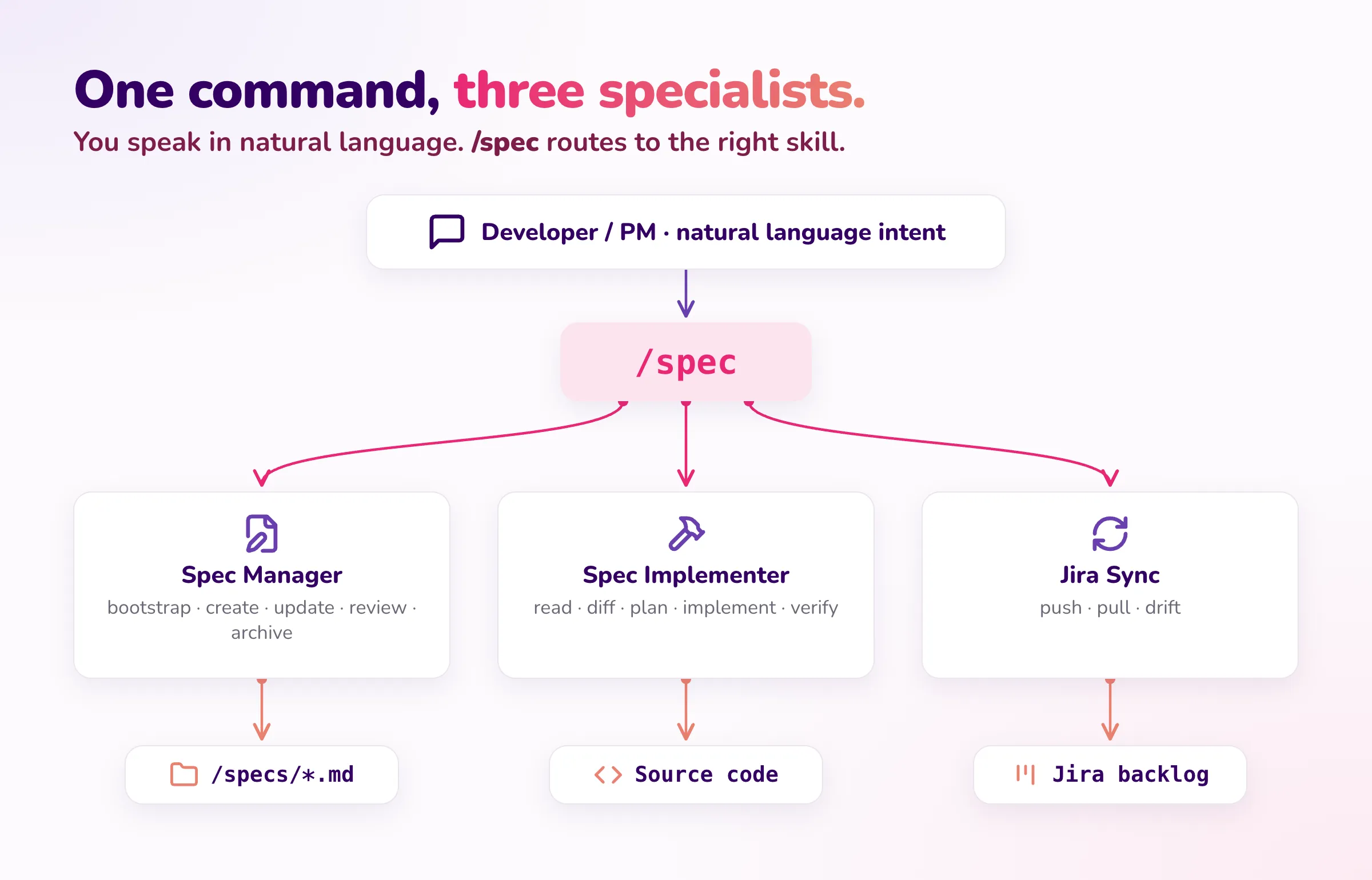
The overview below covers the shape of the system — what each specialist skill does, and the rules that make it work in practice.
1. The Spec Manager Skill
This skill specializes in producing good specs and keeping them that way. It encodes the spec conventions — template, naming, MECE breakdown, abstraction level, cross-domain ownership — and applies them across the full authoring lifecycle: bootstrap, create, update, review, archive. Whichever mode you invoke, the same rules hold.
The trickiest mode is bootstrap from a technical document, which is also where AI most commonly fails — it tends to reproduce technical details as product requirements verbatim, producing specs that read like repackaged TDDs.
The skill counters this with an abstract-up step. For each technical statement in the source, it asks: “What is the user trying to accomplish?” — and writes that instead.
| Technical source says | Product spec says |
|---|---|
POST /api/v1.0/purchaseInvoices | ”When an invoice is received, the system captures the vendor, amount, and line items" |
| "Use OCR to extract header fields" | "The system automatically reads invoice header information" |
| "Deploy API adapter on port 7048” | Constraint: “Must integrate with the existing on-premises ERP” |
The technical details aren’t lost — they get routed to a separate TDD generator skill so they live in docs/ or an ADR, not in the product spec.
The skill also enforces a three-question test for whether something even qualifies as a product spec domain:
- Does a user depend on the outcome of this? (If no → technical spec)
- Can you describe it without specifying protocols or implementation? (If no → technical spec)
- Would a non-technical stakeholder need to validate this? (If no → technical spec)
auth-middleware is a technical component (no user interacts with it) — it goes in docs/. invoice-review-queue is a user workflow (the invoice reviewer works there) — it gets a product spec.
2. The Spec Implementer Skill
This skill specializes in turning spec changes into working code. The developer’s interface stays minimal — requirements arrive in any format, you update the spec, you tell Claude to implement.
Under the hood the skill runs a more disciplined loop: load the full spec for context, detect what changed via git diff, explore the codebase for relevant patterns, plan the change (lightweight for small updates, explicit for cross-cutting ones), implement incrementally following existing conventions, then verify each acceptance criterion against the result before committing with a reference back to the spec.
The rule that keeps the spec and code in lockstep: never deviate from the spec silently. If something can’t be implemented exactly as the spec describes, the skill flags it back rather than guessing — surfacing the conflict as a Risks & Open Question on the spec for human decision. Spec drift dies here.
3. The Jira Sync Skill
This is the optional skill that keeps specs and Jira honest if your org uses both. Three modes:
- Specs → Jira — push spec acceptance criteria as Jira stories, grouped under one epic per spec file.
- Jira → Specs — bootstrap specs from an existing Jira backlog (useful when adopting Spec-Driven Development on a long-running project).
- Drift Check — compare both sides and report the gap.
The mapping is straightforward:
/specs/workflow-name.md     →  Jira Epic: "[Workflow Name]"
  Acceptance Criterion #1   →    Story: "[Criterion text]"
  Acceptance Criterion #2   →    Story: "[Criterion text]"
  Open Question #1          →    Story (flagged/blocked)
The drift check is the part that earns its keep over time. It produces a report like this:
## Drift Report — 2026-05-09

### Spec criteria without Jira tickets
| Spec          | AC-ID | Criterion                          | Action            |
| ------------- | ----- | ---------------------------------- | ----------------- |
| reporting.md  | AC-14 | CSV export for large datasets      | Create Jira story |
| reporting.md  | AC-15 | Export audit logging               | Create Jira story |

### Jira tickets without spec criteria
| Ticket   | Summary                | Status     | Action                                    |
| -------- | ---------------------- | ---------- | ----------------------------------------- |
| RPT-150  | Add PDF watermark      | To Do      | Add to specs/reporting.md or remove       |
| AUTH-110 | SSO timeout config     | In Progress| Add to specs/authentication.md            |

### Possible text mismatches
| Spec     | AC-ID | Jira     | Difference                                                   |
| -------- | ----- | -------- | ------------------------------------------------------------ |
| auth.md  | AC-3  | AUTH-103 | Spec says "30-min timeout", Jira says "15-min timeout"       |
A few sync rules that prevent the most common failure modes:
- Never create duplicate stories. Check by label
spec:{filename}+{ac-id}before creating. - Never overwrite Jira metadata. Assignee, sprint, status, story points are sacred — sync only adds, never silently mutates.
- Never auto-update story text. If a criterion changed, flag it for human review rather than silently rewriting the Jira story.
A worked example: /spec end-to-end
Here’s what a small feature actually looks like running through the three skills via /spec.
Requirements arrive. In practice the input is usually a longer artifact — a requirements document, a meeting transcript, a feature brief — not a one-line message. The typical move is to paste the whole thing into the spec generator and let the Spec Manager Skill abstract it up. For illustration, imagine the source boils down to something like this from a finance stakeholder:
We need an invoice review queue. Maya in AP is re-keying 80–120 PDFs a day. We want auto-extraction with human review, low-confidence fields flagged, and invoices over $5K need a second approval from Tariq. Must integrate with our ERP, and approved invoices should appear there within 24 hours.
In a real engagement the source would be much richer — pages of context, edge cases, prior decisions, constraints scattered across sections. That richness is exactly what a spec absorbs and structures.
Generate the spec. Point /spec at the source:
/spec generate from these requirements: [paste the requirements doc or transcript]The Spec Manager Skill creates /specs/invoice-review.md with the full template — Problem, Users (Maya, Tariq), Goals, Non-Goals, acceptance criteria abstracted from the source, Constraints, and any Open Questions where the source was silent (e.g. the confidence threshold).
Review and validate. The developer reads the generated spec, refines anything that drifted (over-specific phrasing, missing edge cases, technical details that snuck into a product spec), and then validates with the PM as a PR diff. The PM edits a few criteria, signs off. The diff is the contract.
Implement.
/spec implementThe Spec Implementer Skill produces the code — extraction service, side-by-side review UI, confidence-flag pipeline, decision log, two-stage approval for ≥ $5K, batch sync to ERP, search and filter — verifying each acceptance criterion against the result before commit.
Sync to Jira (optional).
/spec sync to JiraThe Jira Sync Skill pushes the spec as an epic with eight stories, labeled spec:invoice-review for traceability.
That’s the full loop — natural-language requirement → spec → implementation → tickets. Three commands, one shared artifact (/specs/invoice-review.md), and the team keeps the diff-is-the-contract review surface throughout.
Specs Beyond Coding
The gains AI brought to coding don’t stop at code. Anything downstream of the spec — tests, tasks, documentation — can be regenerated and kept current the same way. Once the spec is the source of truth, everything that traces back to it benefits from the same shift: humans write the spec, AI handles the mechanical translation into the downstream artifact.
Two applications I’ve seen pay off the most in practice are QA test case generation and task management.
QA test case generation
One of the most underrated payoffs of treating the spec as the source of truth is QA test case generation.
Traditionally, manual QA teams spend days writing test cases — reading user stories, mapping acceptance criteria, drafting Given/When/Then scenarios, and copy-pasting them into Azure DevOps or TestRail one field at a time. With specs, that work collapses. Acceptance criteria are already structured in the spec; Claude reads them and generates the test cases in seconds — including edge cases QAs might have missed.
The QA team’s job shifts from authoring tests to validating, expanding, and running them. That’s the work that actually requires human judgment — the part that benefits from a domain expert’s eye. The mechanical translation of “AC-12: CSV export available for all report types” into a Given/When/Then scenario in TestRail — the part QAs lose entire days to — disappears.
If the test cases are themselves committed alongside the spec (or generated on demand from spec diffs), the testing artifact stays in lockstep with the requirements. The classic “manual test cases drifted from the actual product behavior” failure mode goes away.
Task management with a /tasks folder
The same pattern that works for specs works for tasks. Most teams I’ve seen adopt Spec-Driven Development eventually drop manual Jira ticket creation and manage tasks the same way: a /tasks folder of Markdown files, version-controlled alongside /specs and the code.
The structure mirrors the spec folder — one task file per feature or domain area, with each file listing the work derived from the corresponding spec. When a spec gets a new acceptance criterion, the matching task file gets a new entry. Tasks track status (Not Started / In Progress / Done), reference specific AC IDs, and capture blockers or open questions inline. Claude generates the task entries directly from spec diffs, so the manual translation step (“now go create the Jira ticket”) disappears.
Why teams move to this:
- One mental model. Specs are Markdown. Tasks are Markdown. Everything is in the repo, diffable in PRs, attributable in git.
- No drift. Tasks reference spec ACs by ID. If an AC moves or gets deprecated, the link is right there in the file.
- Frictionless review. A PR shipping a feature contains the spec change, the task entries, and the implementation — all in one diff.
For organizations that need Jira for reporting, time tracking, or compliance, this won’t replace it — see Specs and Project Management above. But for teams whose primary goal is move fast and ship, the /tasks folder pattern eliminates an entire layer of tooling friction — the same way /specs did for requirements.
Where to Go From Here
If you take one thing away from this guide: stop throwing away your prompts. The prompt is your spec. Capture it once, version-control it, and let the AI regenerate the code from it as the spec evolves.
Two natural entry points: write the spec for a new feature and let the AI generate from it, or bootstrap a spec from existing code using the Spec Manager Skill’s bootstrap mode. Either works — pick whichever fits the codebase you’re in.
Concretely, here’s what I’d do this week:
- Pick a small feature — new, or an existing one that’s actively changing.
- Write or bootstrap its spec using the template above — user workflow, acceptance criteria, constraints, non-goals.
- Get PM sign-off. The diff is the contract.
- Point the AI at the spec. For a new feature, let it generate the implementation. For an existing one, implement the next change spec-first by updating the spec, then pointing the AI at the diff.
- When more changes arrive, keep updating the spec first. Compare the experience to your old workflow.
If it clicks, expand to a second spec. Either path is doable in an afternoon for one well-scoped feature.
Specs aren’t extra work. They’re the work you were already doing, captured once instead of repeatedly reinvented.
If you build your own version, I’d love to hear how it goes — find me on LinkedIn.