Originally published on Medium, June 2025.
Source code: available on GitHub
Table of contents
Open Table of contents
- The Problem
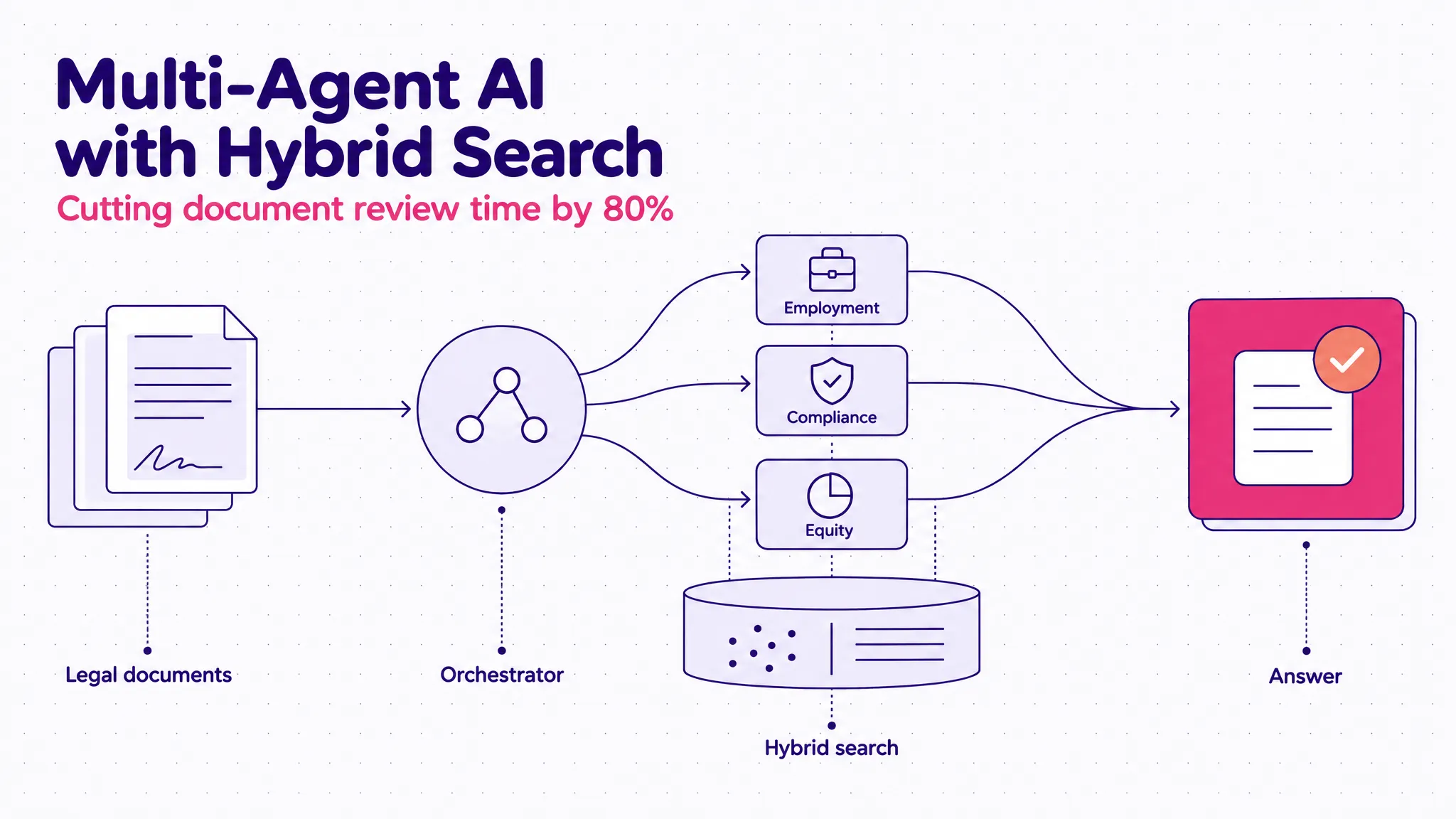
- The Solution: Multi-Agent AI & Hybrid Search
- Demonstration
- How It Works: Step-by-Step Process
- Multi-Agent Configuration
- Structured Output Validation
- Why LanceDB for RAG
- Evaluation Metrics: Ensuring Reliability for Agents
- Implementation Considerations and Lessons Learned
- Installation Guide
- Closing Thoughts
The Problem
Document review is time-consuming, repetitive, and expensive — especially for specialized professionals like lawyers, auditors, or compliance specialists. What if you could cut review time by 80% without sacrificing accuracy?
Traditional document review means sifting through hundreds of pages to find the right clause or compliance requirement. Teams get bogged down by:
- Manual document search — countless hours spent searching through documents
- Repetitive questions — same queries asked repeatedly across projects
- Missing context — complex questions require understanding multiple documents
In this article, I’ll walk through how we built an AI-powered document review platform leveraging a Multi-Agent Orchestrator and LanceDB’s Hybrid Search to significantly accelerate review workflows — with an ultimate goal of reducing review time by up to 80%.
We’ll use a Legal Tech example, but the principles apply to any document-heavy industry.
The Solution: Multi-Agent AI & Hybrid Search

The approach combines two fundamental building blocks:
1. Multi-Agent AI
Modern LLMs face context window and attention mechanism limitations. Our solution uses multiple specialized agents — each acting as a Domain Expert — allowing us to prompt engineer, fine-tune, and optimize each agent separately within these constraints.
An Orchestrator Agent routes user requests to the appropriate specialist based on query analysis.
In our Legal Tech example, we have agents for employment matters, compliance, and equity management.
2. Hybrid Search
Semantic Search alone struggles with specific information like names, addresses, or exact terms — often needed in document domain problems.
We solve this by combining Cosine Similarity with BM25 full-text search using RRF (Reciprocal Rank Fusion) re-ranking, which consistently outperforms standalone semantic search. LanceDB enables this approach with a single streamlined solution with very little DevOps overhead. (More details in “Why LanceDB for RAG” below.)
Demonstration
The demo repository showcases a simplified version of our solution: a React application integrated with Python FastAPI that enables users to upload employment contracts and interact with specialized AI agents through natural language queries.
We can start by uploading documents using the Document Store:

After uploading John Doe’s employment contract, the system can answer employment-related questions using the document context. For other domains, the Orchestrator Agent routes queries to the appropriate specialized agent.
For demo purposes you can identify which agent responded by the prefix in each answer (e.g. [Employment Expert], [Equity Management Expert], etc.).
From the examples below, the first two employment questions are routed to the [Employment Expert] agent, while the third equity question goes to the [Equity Management Expert] agent.

And here’s a compliance question example — the Orchestrator Agent routes this query to the [Compliance Specialist].

The app homepage also includes a Document Embeddings section for debugging chunking strategies and testing retrieval quality. When searching “What’s John Doe’s place of work?”, you can inspect exactly which chunks would be retrieved, their relevance scores, and source attribution — allowing you to validate and optimize your chunking strategy.

Example Employment Contract document section, retrieved from the query above:

Future scope: citations for source attribution
A high-impact next feature for this solution is implementing inline citations within the AI-generated answers. Each response from a specialized agent would be augmented with references to the specific document chunks that informed the answer.
This is especially critical in domains like legal and compliance where traceability and transparency are essential.
How It Works: Step-by-Step Process
Step 1: Document ingestion & chunking
Documents are uploaded and split into “chunks” (sections, clauses, paragraphs) while preserving context. Each chunk is embedded and stored in LanceDB with metadata including document name, section, and category.
For demo purposes we use a simple recursive text splitting, but the chunking strategy will depend on your document format. For example, we found that section-based chunking works quite well with legal documents as the sections (e.g. Agreed Terms, Employment Terms, etc.) are quite cohesive, semantically related, and fall within the recommended 300–600 token embedding range, and offer a natural boundary, ensuring there’s no overlap.
# Split text into chunks
from langchain.text_splitter import RecursiveCharacterTextSplitter

text_splitter = RecursiveCharacterTextSplitter(
    separators=["\n\n", "\n", ". ", " "],
    chunk_size=500,
    chunk_overlap=50,
)
chunks = text_splitter.split_text(text)

# Get embeddings for all chunks
embeddings = self.embeddings_model.embed_documents(chunks)

# Create document chunks with vectors
documents = []
for i, (chunk, embedding) in enumerate(zip(chunks, embeddings)):
    documents.append(
        DocumentChunk(
            vector=embedding,
            text=chunk,
            document_id=document_id,
            document_name=document_name,
            chunk_index=i,
            section=identify_section(chunk),
        )
    )

await self.table.add(documents)
Step 2: Multi-agent orchestration
The orchestrator analyzes queries and routes them to specialized agents. Each agent is optimized for its domain and provides accurate, contextual responses to user questions within its area of expertise.
# Route the query using an LLM call
routing_decision = await self.client.chat.completions.create(
    model=self.azure_deployment,
    messages=[{"role": "user", "content": routing_prompt}],
    response_model=RoutingDecision,
    max_retries=2  # Retry on validation failure
)

# Define agent handlers with their corresponding configs
agent_handlers = {
    AgentName.EMPLOYMENT: lambda q: self._handle_employment_query(q, employment_config),
    AgentName.COMPLIANCE: lambda q: self._handle_compliance_query(q, compliance_config),
    AgentName.EQUITY:    lambda q: self._handle_equity_query(q, equity_config)
}
# Use the appropriate handler or return a default message
handler = agent_handlers.get(routing_decision.agent_name)
if handler:
    return await handler(query)
Step 3: Agent execution with hybrid search
Once routed, the specialized agent performs hybrid search to retrieve relevant context, then generates a grounded response using the retrieved information:
async def _handle_employment_query(self, query: str, employment_config: dict) -> str:
    """Handle queries related to employment and stock options."""

    # Step 1: Hybrid Search for Context Retrieval
    query_embedding = self.embeddings_model.embed_query(query)

    search_query = self.table.query()
    search_query = search_query.nearest_to(query_embedding)  # Vector similarity search
    search_query = search_query.nearest_to_text(query)       # Full-text search component
    search_query = search_query.rerank()                     # Combine and normalize relevance scores
    search_query = search_query.limit(limit)                 # Limit results

    relevant_context = await search_query.to_list()

    # Step 2: RAG-Powered Gen AI
    employment_prompt = self.tasks_config["answer_employment_question"]["description"].format(
        query=query,
        relevant_context=relevant_context,
        agent_role=employment_config["role"],
        agent_goal=employment_config["goal"],
        expertise_areas="\n".join([f"- {item}" for item in employment_config.get("expertise_areas", [])]),
        response_guidelines=employment_config.get("response_guidelines"),
        tone=employment_config.get("tone")
    )

    # Generate structured response with retrieved context
    answer = await self.client.chat.completions.create(
        model=self.azure_deployment,
        messages=[{"role": "user", "content": employment_prompt}],
        response_model=Answer,
        max_retries=2
    )

    return f"**[Employment Expert]** {answer.content}"
Hybrid search:
async def search(self, query: str, limit: int = 5):
    """Search for documents matching the query using hybrid search."""
    # Ensure FTS index exists before searching
    await self.ensure_fts_index()

    # Get query embedding
    query_embedding = self.embeddings_model.embed_query(query)

    # Build hybrid search query step by step
    search_query = self.table.query()
    search_query = search_query.nearest_to(query_embedding)  # Vector similarity search
    search_query = search_query.nearest_to_text(query)       # Text search component
    search_query = search_query.rerank()                     # Combine and normalize scores
    search_query = search_query.limit(limit)                 # Limit results

    # Execute search and return results
    results = await search_query.to_list()
    return results
Multi-Agent Configuration
The heart of our system lies in the YAML-based agent configuration that defines specialized roles and capabilities. Each agent is configured with specific expertise areas in agents.yaml:
orchestrator:
  role: Request Orchestrator
  goal: >
    Accurately categorize incoming requests into one of the following categories: Employment Expert, Compliance Specialist, or Equity Management Expert
  backstory: >
    You are the primary point of contact for all legal support queries.
    Your expertise lies in understanding the intent behind user requests
    and directing them to the right specialized agent.
  routing_guidelines:
    - Questions about employment contracts, salaries, vesting, or HR-related matters should be routed to the Employment Expert.
    - Questions about equity management, shareholders, cap tables, directors, PSCs, voting rights, or classes should be routed to the Equity Management Expert.
    - For ambiguous or unclear requests that are not related to the predetermined categories, you should ask for more information.
  tone: neutral and helpful

employment_expert:
  role: Employment Expert
  expertise_areas:
    - Standard employment contract clauses
    - Stock options basics (vesting schedules, strike prices, exercise periods)
    # ...
  tone: professional and informative

equity_management_expert:
  role: >
    Equity Management Specialist
  goal: >
    Provide accurate, data-driven insights about equity management ...
  backstory: >
    You are a highly experienced expert specializing in equity management ...
  expertise_areas:
    - Company director and secretary information analysis
    - Persons with Significant Control (PSC) identification and management
    # ...
  response_guidelines: >
    You always aim to provide clear, data-driven insights based on ...
  tone: professional and analytical
And tasks.yaml defines the prompts:
answer_employment_question:
  description: >
    {agent_role}

    {agent_backstory}

    Your goal: {agent_goal}

    You need to answer the following question about employment or stock options:
    "{query}"

    Your areas of expertise include:
    {expertise_areas}

    Based on this question, provide expert guidance on employment contracts, stock options, or related areas.

    Use the following relevant information from our company documents to inform your answer:

    {relevant_context}

    Response guidelines:
    {response_guidelines}

    Please maintain a {tone} tone in your response.
  expected_output: A detailed answer to the employment/options question based on company documents and best practices

answer_equity_question:
  description: >
    {agent_role}

    {agent_backstory}

    Your goal: {agent_goal}

    You need to answer the following question about equity management, shareholders, or company structure:

    "{query}"

    Your areas of expertise include:
    {expertise_areas}

    Please maintain a {tone} tone in your response.
  expected_output: A detailed, data-driven answer based on the company's equity and shareholding information
Structured Output Validation
The system ensures reliable agent responses using Pydantic models with Instructor:
# Patch Azure OpenAI client with Instructor for structured outputs
client = AsyncAzureOpenAI(
    api_key=self.azure_api_key,
    api_version=self.azure_api_version,
    azure_endpoint=self.azure_endpoint
)
self.client = instructor.apatch(client)

class Answer(BaseModel):
    content: str = Field(description="The detailed answer to the user's question")

# Guaranteed structured response format
answer = await self.client.chat.completions.create(
    model=self.azure_deployment,
    messages=[{"role": "user", "content": prompt}],
    response_model=Answer,  # Enforces structure
    max_retries=2  # Auto-retry on validation failure
)
Why LanceDB for RAG
A common anti-pattern
A common workflow AI developers follow is to try RAG using cosine similarity, but they don’t get far and realize that in order to improve accuracy they need full-text search or SQL filters. The expansion from vector (cosine similarity) to full-text search often means integrating a new system or reconfiguring your current stack. This introduces a lot of friction to development.
Indexing anti-pattern: vector + full-text + SQL in separate systems
- How it works: store documents in a vector store (e.g., Pinecone, FAISS), a text search engine (e.g., Elasticsearch, OpenSearch), and an SQL database (e.g., PostgreSQL)
- Drawbacks: duplication of data; need to keep both stores in sync; increased infrastructure complexity

LanceDB: an alternative elegant solution
In contrast, LanceDB addresses this problem very elegantly by letting you use a single data store with multiple index types:

Problems solved:
- No data duplication: same documents stored once with multiple indexes
- No sync issues: indexes automatically stay consistent
- No DevOps overhead: LanceDB requires minimal setup — just point it to an S3 bucket or Azure Blob Storage and start querying. This contrasts sharply with the anti-pattern approach requiring separate infrastructure for each index type.
- Simplified implementation: one database, one query interface — if you need a new index, just define it in code.
- Built-in hybrid search: native support for combining search types
Evaluation Metrics: Ensuring Reliability for Agents
From our experience, it’s almost impossible to solve a high-value domain problem without having a good evaluation strategy. For a deeper dive into this topic, I recommend reading Hamel Husain’s blog on Evals — he’s one of the leading voices on the topic.
Why evals are needed for multi-agent systems
Originally, when we tried implementation without evals, we quickly realized that we couldn’t progress because any time our client asked us to add an additional agent or additional queries, we would, for example, prompt engineer the Orchestrator to handle the new cases — however, this would cause certain existing routing queries to stop working correctly. The routing logic would break in unexpected ways.
Testing agent routing accuracy
Unit tests are a great starting point for evals. Once we implemented them, we could immediately identify failing tests and iterate on the Orchestrator Agent’s prompts and routing logic with confidence, knowing we wouldn’t break existing functionality. Using pytest, we can verify that our orchestrator correctly routes user queries to the appropriate specialized agents.
# Define canonical test cases for each agent
EMPLOYMENT_QUERIES = [
    "How much is John Doe's salary?",
    "What's John Doe's job title?",
    "What is an employment contract?",
    "How do stock options typically vest?"
]

COMPLIANCE_QUERIES = [
    "What GDPR obligations does our company have?",
    "Do we need to register with the ICO for data protection?",
    "What are the data protection requirements for storing employee data?",
    "What compliance checks are needed before onboarding an employee?"
]

EQUITY_QUERIES = [
    "Who are the current shareholders of the company?",
    "Show me the breakdown of share classes.",
    "How many shares are available in the option pool?",
    "What voting rights do preference shares have?"
]

@pytest.fixture(scope="module")
def legal_support():
    """Returns LegalSupportAgents with stubbed specialist agents."""
    c = LegalSupportAgents(debug_enabled=False)

    # Stub the specialist agents so only routing is tested
    c._handle_employment_query = AsyncMock(return_value="EMPLOYMENT_HANDLER_OK")
    c._handle_compliance_query = AsyncMock(return_value="COMPLIANCE_HANDLER_OK")
    c._handle_equity_query = AsyncMock(return_value="EQUITY_HANDLER_OK")

    return c

@pytest.mark.asyncio
@pytest.mark.parametrize("query", EMPLOYMENT_QUERIES)
async def test_routes_to_employment(legal_support, query):
    # Reset mock call counts before each test
    legal_support._handle_employment_query.reset_mock()
    legal_support._handle_compliance_query.reset_mock()
    legal_support._handle_equity_query.reset_mock()

    result = await legal_support.process_query(query)

    # Verify correct agent was called
    legal_support._handle_employment_query.assert_awaited_once()
    legal_support._handle_compliance_query.assert_not_called()
    legal_support._handle_equity_query.assert_not_called()

    assert result == "EMPLOYMENT_HANDLER_OK"
Orchestrator routing testing is just one example — you can develop testing scenarios tailored to each agent’s domain expertise. The key principle is ensuring your evals align with business value and measure what actually matters for your clients.
Implementation Considerations and Lessons Learned
Agent design: the critical success factor
We found that the main contributing factor for multi-agent design success is establishing clear agent partitioning and responsibility assignment. Overlapping agent responsibilities can introduce significant development overhead, causing routing confusion and maintenance complexity.
Our approach: MECE + Domain-Driven Design (DDD)
1. Apply the McKinsey MECE principle — Work closely with domain experts to deeply understand the requirements and apply MECE (Mutually Exclusive, Collectively Exhaustive) for agent responsibility partitioning:
- Mutually Exclusive: each query type should ideally have only one correct agent destination
- Collectively Exhaustive: all possible queries can be handled by at least one agent
- Clear Boundaries: agents have distinct, well-defined domains of expertise
2. Embrace Domain-Driven Design — Adopt a DDD philosophy with a strong emphasis on ubiquitous language. Just as DDD reduces friction in software development, it’s equally valuable for AI applications. Clear domain boundaries and shared terminology between business experts and developers ensure agents align with actual business processes.
By using DDD, you’ll progressively start seeing unexpected benefits. For example, you can empower domain experts to design the prompts. Here’s a great article by Hamel Husain on the topic.
Example: Legal Tech agent partitioning
Our implementation demonstrates the domain separation that we achieved by working closely with our clients from the Legal Tech domain:
- Employment Expert: salary, contracts, stock options, HR policies
- Equity Expert: cap tables, shareholders, funding rounds, ownership
- Compliance Expert: regulatory requirements, platform capabilities
Installation Guide
Quick start
The full source code is available on GitHub. Get started in under 5 minutes.
Environment setup
First, create a .env file in the ai-engine/ directory with your credentials:
# Azure OpenAI Configuration
AZURE_OPENAI_KEY=your_azure_openai_key_here
AZURE_OPENAI_ENDPOINT=https://your-resource.openai.azure.com/
AZURE_OPENAI_VERSION=2024-02-15-preview
GPT4_DEPLOYMENT_NAME=gpt-4
EMBEDDING_DEPLOYMENT_NAME=text-embedding-ada-002

# LanceDB Configuration (optional - defaults to local storage)
LANCEDB_URI=./lancedb_data
Note: I used Azure OpenAI due to my client’s compliance requirements, but you can use any model provider (OpenAI, Anthropic, local models, etc.). Simply reconfigure the environment variables and update the model interfaces in the code.
Running locally
If you have Docker installed, you can use the docker-compose.yml. Otherwise, feel free to set it up manually.
Manual development setup
Backend (FastAPI):
cd ai-engine
python -m venv venv && source venv/bin/activate
pip install -r requirements.txt
python app.py  # → http://localhost:8000
Frontend (React + shadcn/ui):
cd frontend
npm install && npm run dev  # → http://localhost:5173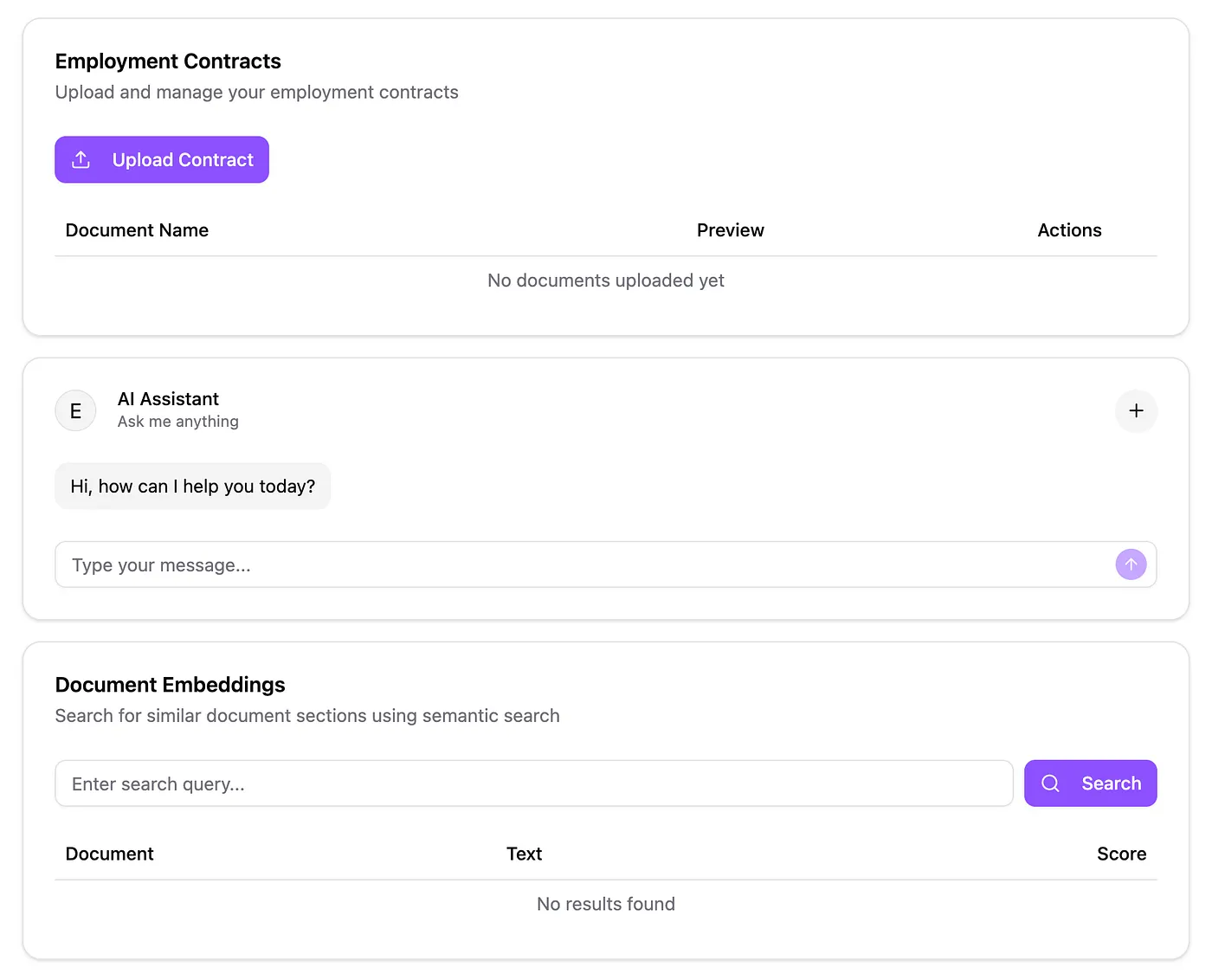
Next, try uploading a document and asking questions to see the multi-agent system in action.
Closing Thoughts
The future of document review is here — and it’s powered by intelligent agents. Whether you’re processing legal contracts, financial reports, or compliance documents, this approach transforms tedious, manual work into instant, context-aware answers — streamlining your workflow like never before.
If you found this article useful, drop a star on the repository or reach out on LinkedIn — happy to discuss multi-agent architectures or RAG patterns.